eCR Viewer Cloud Deployment Guide - Azure
This guide describes how to deploy eCR Viewer on Azure using a managed, Terraform-based approach (i.e., Azure Container Apps).
Primary repo: dibbs-azure
README: https://github.com/CDCgov/dibbs-azure/blob/main/README.md
Prerequisites
Skill requirements
Doing this work will require staff who can:
- Read/write/run Terraform configurations
- Understand Terraform state management
- Work with Azure cloud provider resources (subscription, resource groups, identity/permissions, and supporting services)
Application prerequisites
Before you get started, please make sure you have determined the eCR Viewer configuration your organization plans to use.
View the Setup Guide for information about the available configurations.
Infrastructure prerequisites
The computer (or CI/CD system) you run the deployment from should have:
- Terraform v1.7.4 or later
- Microsoft Azure CLI 2.61.0 or later
- Git
Azure account prerequisites
Before you deploy, you should have:
- An existing Resource Group and Storage Account to store Terraform state files
- A Service Principal with Contributor access to the Resource Group (or an engineer with equivalent access)
- Required Azure resource providers enabled for the services being deployed (e.g., Azure App Gateway and Azure Container Apps)
Architectural Design
The current architectural design for dibbs-azure is as follows:
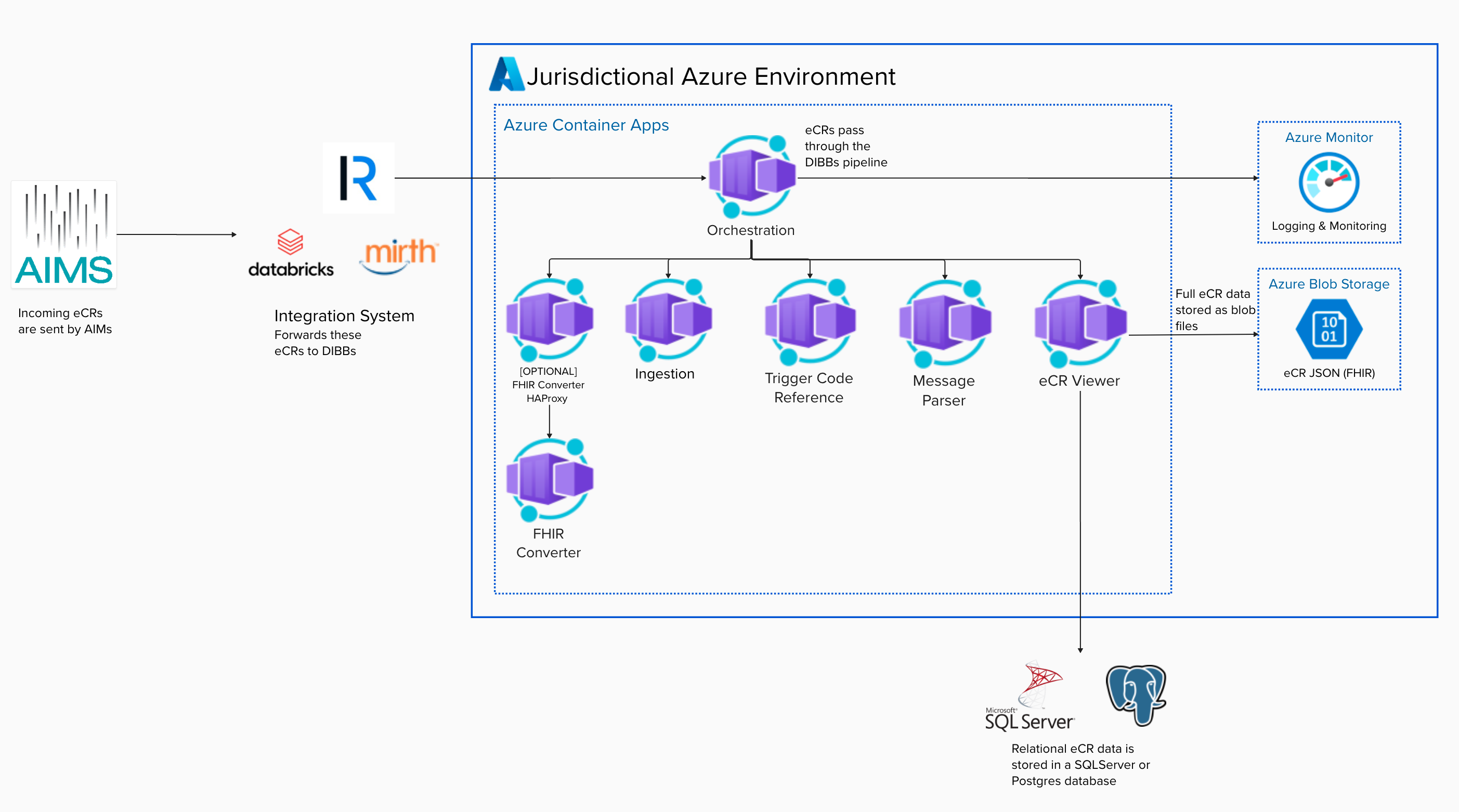
Deployment workflow
Use the dibbs-azure repository and README as the step-by-step source of truth.
The high-level workflow below is provided as a guide to help you understand the overall deployment sequence:
- Start from dibbs-azure (fork or copy into your organization).
- Configure the Terraform backend/state approach and environment settings
- Deploy the infrastructure and Azure Container Apps (ACA) using the repo’s documented workflow.
- Run Technical Acceptance Testing.
Configuration and environment variables
For managed deployments, environment variables are set through the Terraform/ACA configuration. Use the Setup Guide and Environment variable reference to determine:
- Which configuration you are using
- The required environment variables
- What each variable controls